Rootstar: A Playful Display Font for Modern Web Design
I was working on a redesign for a boutique online store that sells handmade stationery and creative supplies. The brand wanted something fresh, approachable, and visually engaging. After testing a few display fonts, I landed on Rootstar. It felt just right—clean yet quirky, with a friendly energy that matched the brand’s personality.
What Makes Rootstar Stand Out?
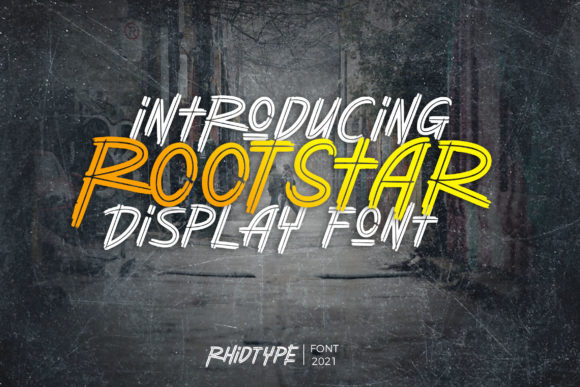
Rootstar is a display font that strikes a balance between playfulness and professionalism. Its clean lines give it a modern feel, while the subtle quirks in its letterforms add character. This makes it perfect for headings, logos, and other visual elements where you want to grab attention without sacrificing readability.
Its versatility is one of my favorite aspects. Whether it's used on a hero section headline or as part of a social media graphic, Rootstar maintains a consistent tone. It doesn’t feel too casual for a professional setting, nor does it come off as stiff or boring for more creative projects.
Testing Rootstar in Real-World Scenarios
I first tested Rootstar in the hero section of the website. The headline “Handmade with Love” looked great over a full-width image of a beautifully crafted notebook. The font didn’t overpower the image, but it added enough visual interest to draw the eye immediately.
Next, I experimented with using it for section headers throughout the site. On product pages, I used Rootstar for titles like “Our Best Sellers” and “New Arrivals.” The contrast against the background was smooth, and the text remained legible even at smaller sizes.
For mobile responsiveness, I made sure the font scaled well without becoming too cramped. Rootstar handled the transition from desktop to mobile layouts smoothly, maintaining its charm across different screen sizes.
Where Rootstar Fits Best
Rootstar works particularly well for short phrases and headlines. It shines in hero sections, landing page titles, blog headers, and promotional banners. It’s not ideal for long blocks of text, which is typical for most display fonts. However, when used sparingly, it adds a nice touch of personality to any design.
I found it especially effective for a creative portfolio site I worked on recently. The client wanted their name and tagline to stand out, and Rootstar delivered that effortlessly. It also looked great in a course sales page, where it helped create a sense of approachability and fun.
Readability and Usability Tips
When using Rootstar, it’s important to consider the background. Light-colored backgrounds work best, especially if you’re using the font on dark images or overlays. For buttons and call-to-action areas, I recommend keeping the text size large enough to ensure quick scanning and easy interaction.
Font pairing is another key consideration. I paired Rootstar with a simple sans serif font for body copy, which created a nice contrast and improved overall readability. This combination kept the design modern while ensuring that the content remained easy to read.
Practical Considerations for Web Use
Before finalizing the use of Rootstar on any project, I always check the available styles and weights. The font includes several variations that allow for flexibility in design. I also confirmed that it supports multiple languages and has proper webfont availability for cross-browser compatibility.
Commercial licensing is essential when using this font for client projects, online stores, or digital templates. I make sure to review the license agreement carefully to avoid any legal issues down the line.
Branding and User Engagement
Fonts play a crucial role in shaping brand identity. Rootstar contributes to a brand’s visual storytelling by adding a touch of personality and creativity. It helps establish a connection with users, making the brand feel more relatable and trustworthy.
In the case of the boutique online store, the use of Rootstar helped reinforce the brand’s message of creativity and care. It aligned perfectly with the brand’s voice and made the overall experience more enjoyable for visitors.
By choosing the right font, designers can influence how users perceive a brand. Rootstar is a great example of a font that can enhance user engagement while maintaining a polished and professional look.