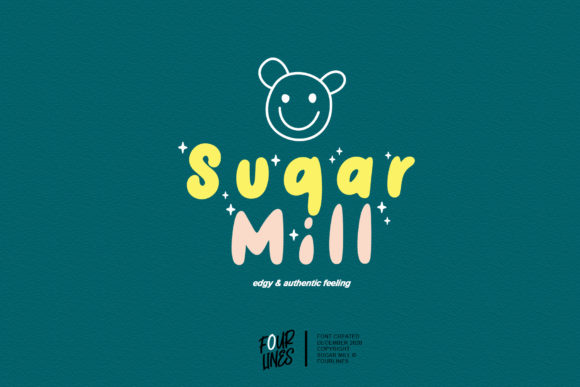
Sugar Mill Font for Web Design
Sugar Mill is a display font that brings a warm, approachable character to digital projects. Its sweet little characters and relaxed style make it ideal for creating friendly, inviting interfaces. As a web designer, I've found that fonts like Sugar Mill can shape the tone of a website without overwhelming the user experience.
Visual Characteristics and Style
Sugar Mill has a soft, handwritten feel with subtle curves and gentle strokes. This gives it a personal touch that stands out in digital spaces where clean, modern typography often dominates. It's not overly decorative but still has enough personality to make a statement.
The font’s casual nature makes it suitable for a variety of digital contexts, from creative portfolios to boutique online stores. Its visual appeal lies in its balance between being readable and expressive.
Applying Sugar Mill in Web Design
When designing for the web, visual hierarchy is key. Sugar Mill works well as a header or title font because it draws attention without distracting from the content. It can be used on hero sections, landing pages, and call-to-action areas to create a welcoming atmosphere.
For example, using Sugar Mill on a coaching website can reinforce a sense of trust and approachability. On a product landing page, it can add a touch of elegance while maintaining clarity.
Use Cases for Sugar Mill
- Hero Sections: Use Sugar Mill for large headlines to capture attention quickly.
- Landing Pages: Apply it to section headings to guide users through the content flow.
- Call-to-Action Areas: Pair it with a sans serif font for buttons to ensure readability and contrast.
- Blog Graphics: Add it to blog headers or featured images for a consistent brand look.
- Digital Ads: Use it sparingly to maintain focus on the message while adding a friendly tone.
Readability and Responsiveness
While Sugar Mill is a display font, it's important to consider how it performs on different screen sizes. For mobile screens, ensure that the font size is adequate and that there's sufficient spacing between characters.
Testing Sugar Mill on dark and light backgrounds is also essential. It may require adjustments in color contrast or additional stroke weights to maintain legibility across all devices.
When using Sugar Mill in small buttons or overlays, keep the text short and impactful. Avoid using it in long paragraphs where readability could suffer.
Font Pairing and Brand Identity
Sugar Mill pairs well with simple sans serif fonts like Helvetica or Arial for body copy. This combination allows the display font to stand out while keeping the rest of the content easy to read.
If your brand identity leans towards editorial design, pairing Sugar Mill with a serif font can create a more refined look. However, always test the contrast and ensure that the pairings work together harmoniously.
For a modern digital brand kit, Sugar Mill can serve as the primary typeface for logos, banners, and other branded assets. Its unique character helps differentiate your brand from competitors.
Practical Considerations
Before implementing Sugar Mill on a live site, check the available styles, file formats, and webfont support. Ensure that the font includes necessary alternates, weights, and multilingual support if needed.
Also, be mindful of commercial font licensing. If you're using Sugar Mill for client projects, online stores, or digital templates, confirm that the license covers these uses to avoid any legal issues.
Finally, consider how Sugar Mill aligns with your overall brand tone. A font with a relaxed style might not be suitable for a highly professional or technical website, but it can be perfect for lifestyle, creative, or service-based brands.
Conclusion
Sugar Mill is a versatile display font that adds warmth and personality to digital designs. Whether you're building a creative portfolio, launching an online store, or crafting a brand-focused website, this font offers a unique way to express your brand’s voice.
By thoughtfully applying Sugar Mill in your layouts, you can enhance readability, improve visual hierarchy, and create a more engaging user experience. Always test it in real-world scenarios to ensure it meets your design goals and maintains a strong brand presence across all platforms.